
|
Oregon Water Resources Department
|
Help |
|
|
|
Oregon Water Resources Department
|
Help |
|
Well Report Query User GuideOverviewOregon Water Resources Department maintains Well Report records for the State of Oregon. Public access to these records are being provided free of charge. Please be sure to read and understand the following disclaimer concerning the use of this information. DisclaimerThe information provided in the tabular information is a subset of information captured from the original well report submitted by the well constructor. Though the Department takes great care to ensure that the data entered is correct, there are data entry errors. The reproduction of the submitted well report in image format is available and takes precedence over the tabular data. The Department cannot, and does not, accept any responsibility for errors, omissions, or accuracy of information in the Well Report database. There are no warranties, expressed or implied, including the warranty of merchantability or fitness for a particular purpose, accompanying this information. However, notification of any errors would be appreciated. Search for Well ReportTo search for well reports, enter the information about the area or well reports for which you want to search. Information that has been entered or selected are combined together to make a query. Information that is left blank is not included in the selection criteria. Once you have specified the criteria, click on the Search button. If you want to erase the criteria you have entered and start fresh, click on the Reset button. The following sections describe each of the options on which you can search: Search by Township, Range, and Section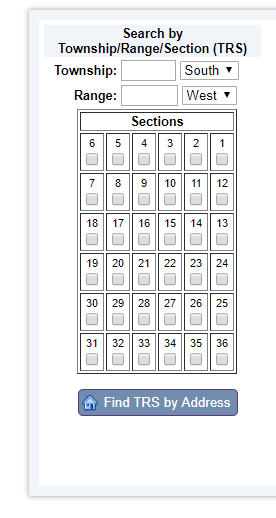
Township and Range lines were defined by Public Land Surveyors in the late 1800's. They define a grid for Oregon and Washington from which all other land surveys are ultimately based. Townships run North and South and Ranges run East and West. In Oregon Township numbers span from 9 North to 41 South and Range numbers span from 50 East to 16 West. While slightly confusing, the combination of a Township number and a Range number uniquely identify a square called a Township. The surveyors where not perfect in laying out this grid, which resulted in gaps in the grid. While there are not many of these, once these gaps were located, they were labeled as fractional Townships. You can specify a fractional Township such as this by using it's decimal equilivent. For example:
Each Township is further divided into a grid of 36, one square mile sections . Click on the check box beneath each of the sections you wish to display. Find TRS by AddressIf you don't know what Township/Range/Section of the location you are looking for, you can attempt to locate it via the "Find TRS by Address" button. You will be provided a screen that will allow you to enter the address of the location. Enter it in a format similar to "725 Summer ST NE Salem, OR". This address lookup uses a free geocoding service based on government TIGER data. You may not be able to find all addresses using this tool. Search by Well Report InformationInformation from the well reports are entered into a database. More current well reports filed through e-filing are more complete. Older well reports may only have partial information entered into the database. Likewise, older well reports had less requirements and may be not be as detailed as current well reports. These attributes may be searched here. Well Log: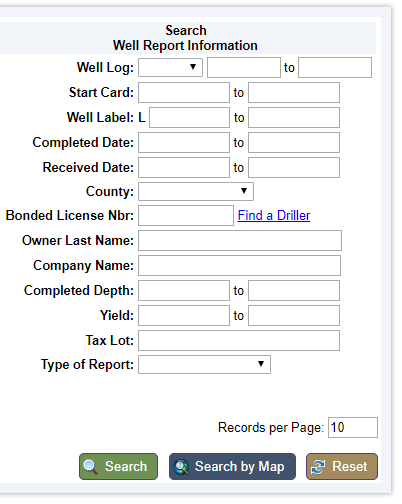
Once a well report has been submitted, the Department assigns a Well Report identifier for the database. This identification is the combination of a county code (which may be different than the county where the well is located) and a numeric id. These combination of these fields allows you to locate an individual well report via this reference number, often refered to as a Well Log. A range of numbers may also be searched, though all for the same county. Start Card:Well constructors file a notice of intent to construct a well called a start card. These are given a unique number. This field allows you to locate an individual well report via this reference number. A range of numbers may also be searched. Well Label:After June 1996, wells constructed, altered, or on property that has changed ownership, have a metal tag placed on them with this number. This field allows you to locate an individual well reports via this reference number. A range of numbers may also be searched. Completed Date Range:This field allows you to specify the date range for which you are searching. Enter the dates in a MM/DD/YYYY format. Recieved Date Range:This field allows you to specify the date range for which you are searching. Enter the dates in a MM/DD/YYYY format. County:If you don't know the Township or if you want to limit the specified Township to a certain county, you can use the County selection. This will enable you to choose 1 of the 36 counties in Oregon. You can specify to ignore the county selection by choosing the blank county option. For example, you can combine owner name and County to locate wells when you don't know the township information. Bonded License Nbr:This is the bonded license number of the well constructor. If only a name is known, use the "Find a Driller" to search for the well constructor. Owner Last Name:The owner name is typically the person who had the well constructed. Usually, this is the landowner at the time the well was constructed. Enter the last name of the person for which you wish to search. The search will automatically return all names that contain the text you enter. For example if you enter "MAC" the system will bring back records such as "MACDONALD", "MACINTOSH", and "DORMACK". Company Name:The company name is typically the name of the company who had the well constructed. However, it is also used to store the names of secondary owners. For example if a well report stated that the owner was Mr. and Mrs. John Doe, the owner name would be Mr. John Doe and the Company name would be Mrs. John Doe. To search on this field, enter the name of the "company" for which you wish to search. The search will automatically return all names that contain the text you enter. For example if you enter "MAC" the system will bring back records such as "MACDONALD", "MACINTOSH", and "DORMACK". Completed Depth Range:The Completed Depth is the finished depth of a well. This field allows you to specify the range of depths for which you are searching. Yield Range:Some wells have had a yield test done. A yield test consists of determining the balance between the maximum amount of water that can be pumped and the amount of recharge back into the well from the surrounding groundwater. Testing is done by continuously pumping water from the well for an extended period, usually an hour or more. This field allows you to specify the range of yields for which you are searching. Tax lot:To search by this identifier, enter it in the tax lot field. Since this information changes over time, this may or may not be the current tax lot for the property. Type of Report:Select one of the options of the type of report to limit the search, as needed. Records per Page:Searches may return hundreds of records and can quickly overwhelm a browser trying to display all those records. To avoid this problem, the "View listing by pages" is checked by default to reduce the amount of records to display at once. You can also further refine how many records are displayed per page. Search by Map
The search by map is a hyperlink to the Well Report Mapping Tool. This tool provides an interactive map for searching as well as many of the well report attributes listed above. It is limited to 1000 records. The Well Report Mapping Tool has it's own help file. Once you have successfully performed a search, you will be presented with a screen full of information. The following section answers some of the questions you may have about this screen.
4.0 What do these columns of data mean? There is a wealth of information provided when you retrieve well report records. The section below defines or describes these columns.
|